SIP trunks
The SIP Trunk add-on lets a customer bring their own SIP trunk as an alternative to — or alongside — the built-in Twilio telephony. Instead of buying numbers through Twilio, a workspace connects an existing carrier trunk (Twilio Elastic SIP, Plivo, Telnyx, and others), imports its numbers, and points an AI agent at them.
It is a plan-gated add-on, exposed by the sip_enabled plan feature. Workspaces on a plan without it never see the SIP navigation entry, and the /app/sip/* routes are protected by the plan.feature:sip middleware. See Billing & credits for how plan features are assigned, and Telephony for the default Twilio path.
What it is
A SIP trunk is a direct voice connection to your own carrier. With this add-on a customer can:
- keep numbers already registered with a carrier instead of porting them to Twilio,
- route inbound and (engine permitting) outbound AI calls over that trunk,
- run SIP and Twilio numbers side by side in the same workspace.
Trunk credentials (username, password, auth id) are encrypted at rest and are stripped before a record leaves the server, so they are never returned in API responses, page props, or JSON.
Engines
Each trunk is bound to a voice engine that drives the AI conversation. The engine determines which call directions are supported.
| Engine | Value | Inbound | Outbound | Recording |
|---|---|---|---|---|
| ElevenLabs | elevenlabs | Yes | Yes | Yes |
| OpenAI Realtime | openai | Yes | No | No |
OpenAI Realtime is inbound-only
The OpenAI Realtime engine rejects a number imported for outbound use. Choose ElevenLabs for a trunk that needs to place outbound calls or capture recordings. The default engine for new trunks is set by SIP_DEFAULT_ENGINE.
Adding a trunk
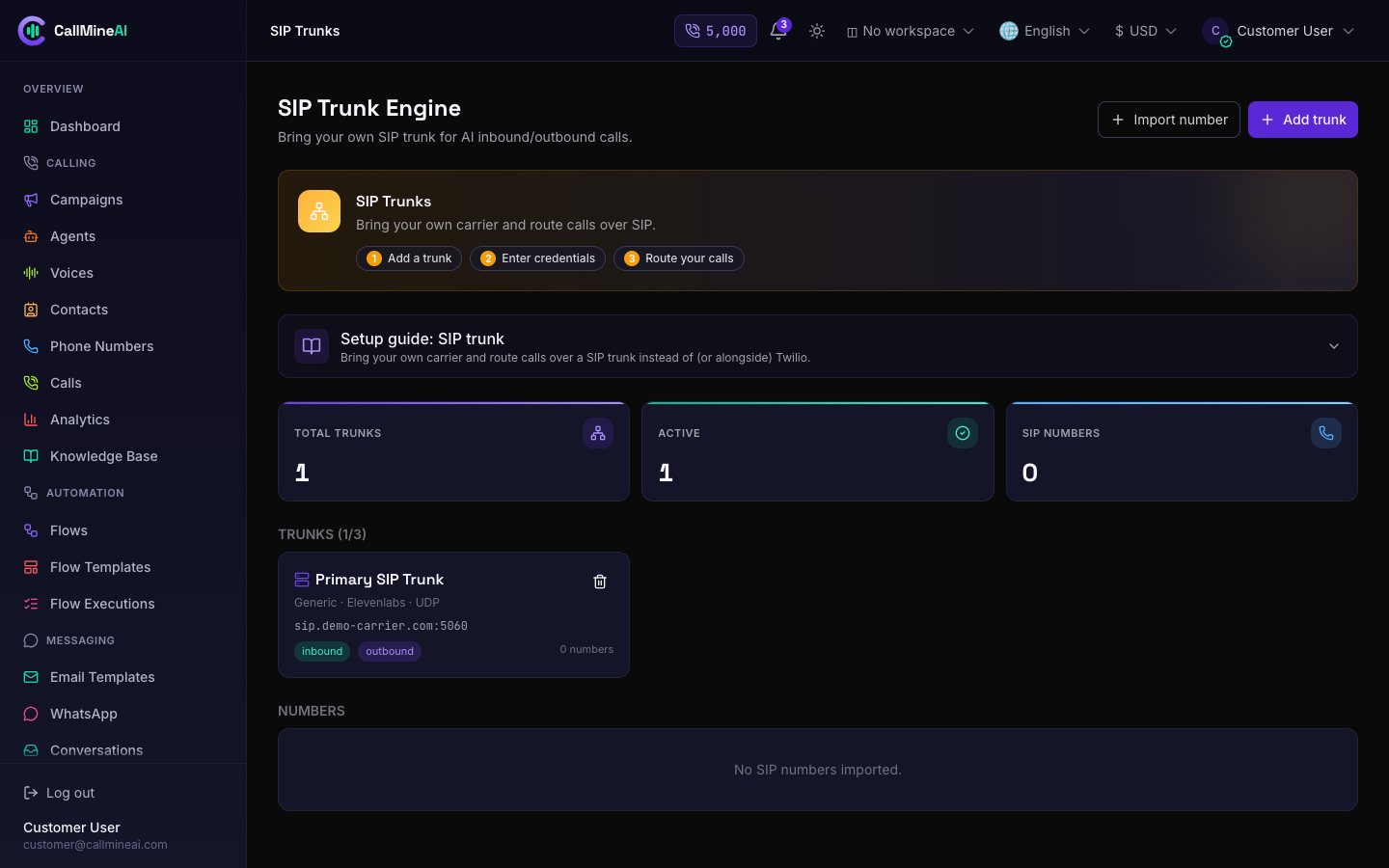
The SIP trunk management page in the customer workspace.
Open SIP Trunks at /app/sip and add a trunk. Pick a provider template to auto-fill the SIP host, port, and transport, then enter the credentials from your carrier.
Available provider templates:
| Provider | Value | Default host | Port | Transport |
|---|---|---|---|---|
| Twilio | twilio | your-domain.pstn.twilio.com | 5060 | tls |
| Plivo | plivo | phone.plivo.com | 5060 | udp |
| Telnyx | telnyx | sip.telnyx.com | 5060 | tls |
| Vonage | vonage | sip.nexmo.com | 5060 | tls |
| Bandwidth | bandwidth | gw.bandwidth.com | 5060 | udp |
| Exotel | exotel | sip.exotel.com | 5060 | udp |
| DIDWW | didww | sip.didww.com | 5060 | udp |
| Zadarma | zadarma | sip.zadarma.com | 5060 | udp |
| Cloudonix | cloudonix | sip.cloudonix.io | 5060 | tls |
| RingCentral | ringcentral | sip.ringcentral.com | 5060 | tls |
| Sinch | sinch | sip.sinch.com | 5060 | tls |
| Infobip | infobip | sip.infobip.com | 5060 | tls |
| Generic SIP | generic | (blank) | 5060 | udp |
Each template is only a starting point — the host, port (1–65535), and transport (udp, tcp, or tls) remain editable. Toggle inbound and outbound per trunk, and set a per-trunk concurrency limit. On save the platform generates a webhook_secret used to verify inbound engine callbacks.
Credentials are write-only
When editing a trunk, leave the password field blank to keep the stored value. Credentials are never sent back to the browser, so an empty field means "unchanged".
Importing SIP numbers & assigning an agent
Once a trunk is active, import the numbers it serves from the same page:
- Choose the trunk and enter the number (it is normalized to E.164).
- Pick the direction —
inbound,outbound, orboth. - Optionally assign an active agent to answer or place calls on that number.
Importing calls the trunk's engine to provision the number; if provisioning fails the import is rolled back. SIP numbers carry source = sip and cost 0 monthly credits (you pay your carrier directly). Use Assign at any time to change the agent, or release the number to remove it.
Limits
Three plan columns cap SIP usage per workspace:
| Limit | Plan column | Enforced on |
|---|---|---|
| Trunks | sip_trunks_limit | Adding a trunk |
| SIP numbers | sip_numbers_limit | Importing a number |
| Concurrency | sip_concurrency_limit | Simultaneous SIP calls |
Attempting to add a trunk or import a number beyond the plan limit is rejected with an error message.
Environment & webhook
SIP_ENABLED=true
SIP_DEFAULT_ENGINE=elevenlabs          # elevenlabs | openai
OPENAI_REALTIME_MODEL=gpt-4o-realtime-preview
Inbound events for OpenAI Realtime trunks arrive at:
POST /webhooks/sip/openai
This route is CSRF-exempt and HMAC-verified against the trunk's webhook_secret; requests that fail verification are rejected.