Telephony (Twilio)
CallMineAI places and receives phone calls through Twilio. Telephony is optional at install time: customers can add their own numbers manually with no credentials, and the platform unlocks number search & purchase once Twilio credentials are configured. This page covers credentials, the env keys, what works with and without them, the admin phone pool, and the webhooks Twilio calls back.
Getting Twilio credentials
You need three things from the Twilio Console:
- Account SID — your account identifier (starts with
AC…). - Auth Token — the account's secret token.
- A From number — a Twilio phone number capable of voice, used as the default caller ID.
The integration talks to Twilio's REST API directly (HTTP Basic auth, no SDK), so no extra packages are required.
Tips
Credentials can be entered in Admin → Engines (stored in the database) or via .env. The database settings take precedence over the env values.
Env keys
| Key | Purpose | Example / Default |
|---|---|---|
TWILIO_ENABLED | Master switch for the Twilio provider | true |
TWILIO_ACCOUNT_SID | Account SID | ACxxxxxxxx… |
TWILIO_AUTH_TOKEN | Auth Token | xxxxxxxx… |
TWILIO_DEFAULT_FROM | Default caller-ID number (E.164) | +15551234567 |
TWILIO_STATUS_CALLBACK_URL | Where Twilio posts call lifecycle events | ${APP_URL}/webhooks/twilio/status |
TWILIO_RECORDING_CALLBACK_URL | Where Twilio posts finished recordings | ${APP_URL}/webhooks/twilio/recording |
TWILIO_ENABLED=true
TWILIO_ACCOUNT_SID=ACxxxxxxxxxxxxxxxxxxxxxxxxxxxxxxxx
TWILIO_AUTH_TOKEN=your-auth-token
TWILIO_DEFAULT_FROM=+15551234567
TWILIO_STATUS_CALLBACK_URL="${APP_URL}/webhooks/twilio/status"
TWILIO_RECORDING_CALLBACK_URL="${APP_URL}/webhooks/twilio/recording"
With credentials vs. without
The provider (App\Services\Telephony\TwilioService) degrades gracefully. isConfigured() returns false when the SID/token are missing or the provider is disabled, and every Twilio call short-circuits with a friendly "not configured" result instead of erroring.
| Capability | Without credentials | With credentials |
|---|---|---|
| Add a number manually (BYO) | ✅ Yes | ✅ Yes |
| Search available numbers | ❌ Disabled | ✅ Yes |
| Buy a number | ❌ Disabled | ✅ Yes |
| Place / receive live calls | ❌ No | ✅ Yes |
So a fresh install is fully usable for setup and demos — customers just can't dial or buy numbers until Twilio is wired up.
The phone pool
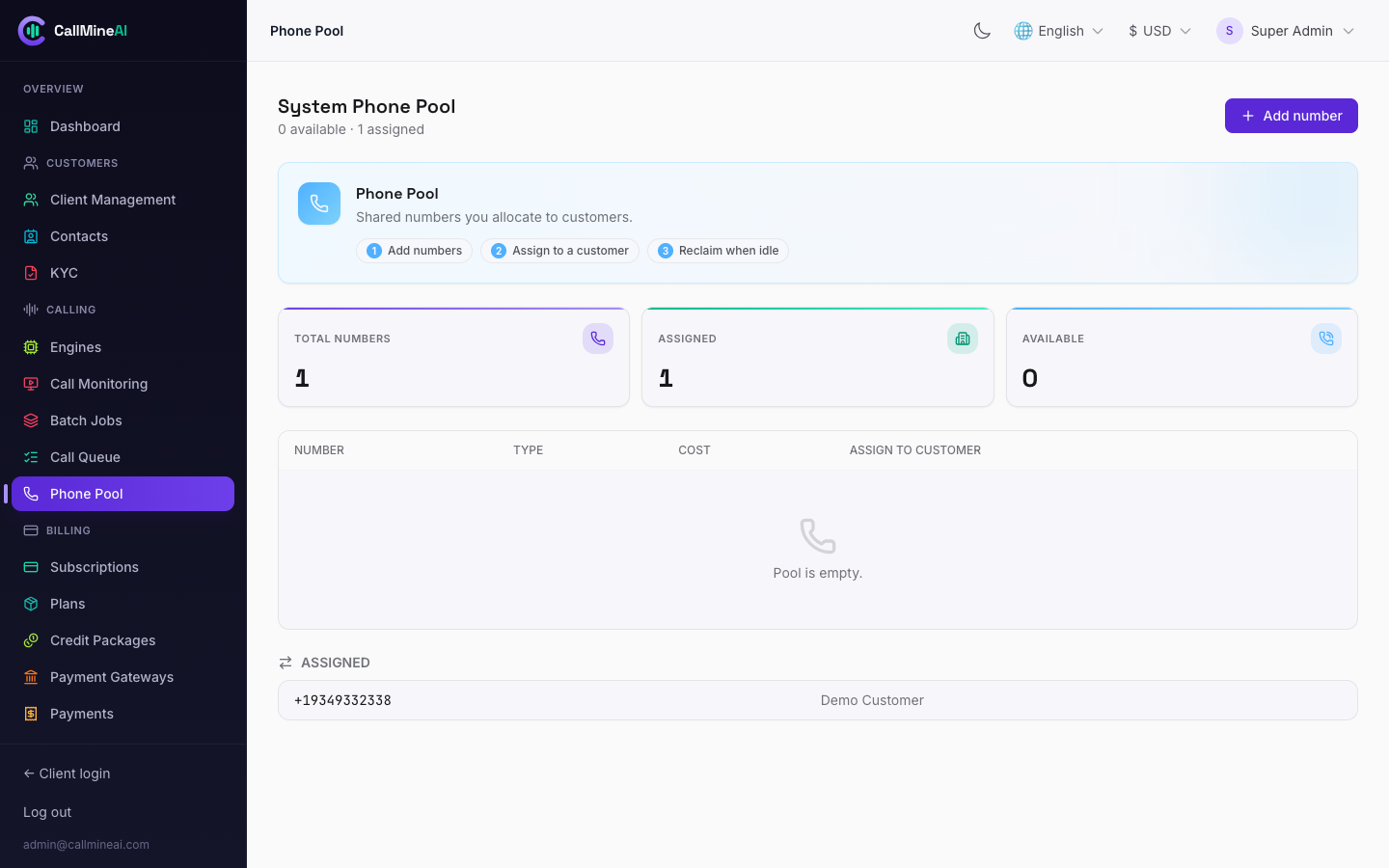
The admin phone-number pool shared across customer accounts.
Beyond customer-owned numbers, admins can maintain a system phone pool of numbers that belong to the platform (not to any one tenant) and assign them to customers as needed. Manage it at /admin/phone-pool:
- Search & buy system numbers via Twilio, or add them manually.
- Assign a pooled number to a specific vendor.
- Release a number back.
Customers manage their own numbers at /app/phone-numbers (search, buy, release).
Webhooks Twilio calls back
During a live call Twilio drives the conversation by posting to these routes. They are declared in routes/web.php and exempt from CSRF because they are called by Twilio, not by a browser session:
POST /webhooks/twilio/voice       # returns TwiML — the call's opening + <Gather> loop
POST /webhooks/twilio/gather      # each speech turn from the caller
POST /webhooks/twilio/status      # call lifecycle: initiated / ringing / answered / completed
POST /webhooks/twilio/recording   # finished recording ready
A public HTTPS URL is required
Twilio must reach your server from the public internet over HTTPS to run a call. localhost will not work — real calls cannot be tested on a purely local machine. In development, expose your app with a tunnel (e.g. ngrok) and point APP_URL (and therefore the callback URLs) at the public host. In production, serve the app over HTTPS.
Monthly number cost
Every active phone number costs a flat monthly fee in credits, set by CALL_NUMBER_COST_CREDITS (default 50, from config/telephony.php). The fee is charged when the number is provisioned and on the recurring monthly cycle; buying a number pre-checks the customer's balance and their numbers plan limit. See Billing & Credits.
See also
- Voice & AI — the voice + LLM brain that runs on top of the call.
- Campaigns & Calls — how numbers, agents and the dialer come together.
- Configuration — full env reference.