Agents & Voices
This page goes deep on the three building blocks of an AI caller: the agent (the persona and brain), the voice (how it sounds), and the knowledge base (what it knows). Together they define exactly how CallMineAI talks to your contacts.
Related: Customer Guide · Campaigns & Calls · Voice AI internals
What an AI agent is
An AI agent is a reusable AI caller you design once and reuse across campaigns. It combines:
- A persona — a tone and personality (e.g. Professional + Persuasive).
- A goal — captured in the system prompt (qualify a lead, confirm an appointment, run a survey).
- A greeting — the opening line the agent speaks when the call connects (it can use variables like the contact's name).
- An LLM model — the language model that drives the conversation.
- A voice — an ElevenLabs voice used to speak.
- An engine — the voice + telephony stack the agent runs on (e.g. ElevenLabs + Twilio).
Computed cost per minute
Each agent shows a cost per minute, computed on save as the voice cost + LLM cost:
| Component | Per‑minute cost |
|---|---|
| Voice (ElevenLabs) | 10¢ |
| LLM — GPT‑4o Mini | 1¢ |
| LLM — GPT‑4o | 15¢ |
So a GPT‑4o Mini agent computes to 11¢/min, a GPT‑4o agent to 25¢/min.
Cost vs. credits
The per‑minute figure is a cost estimate shown on the agent. Actual billing is drawn from your credit balance at roughly 1 credit per call minute — see Billing & Credits.
Building an agent
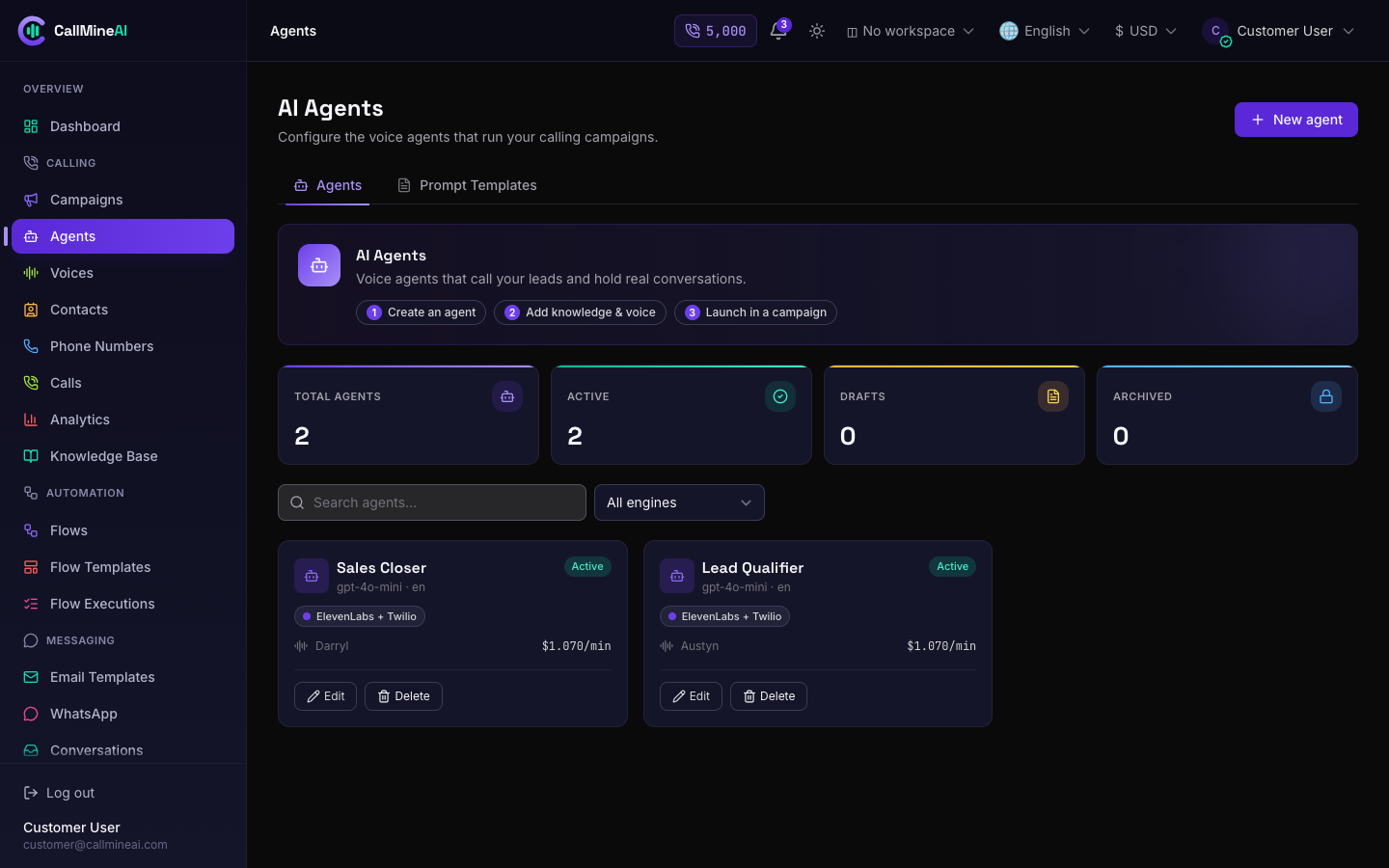
The agents list in the customer workspace.
/app/agents
The Agents page lists your agents with their status (Draft / Active / Archived), engine, voice, LLM model and computed cost. Click Create to open the builder:
/app/agents/create
Fields:
| Field | Notes |
|---|---|
| Name | Required. How you identify the agent internally. |
| Voice | Optional. An ElevenLabs voice from your library (see Voices). |
| Language | Required. The agent's spoken language. |
| LLM model | Required. GPT‑4o Mini (cheap, fast) or GPT‑4o (stronger). |
| Engine | Required. Voice + telephony stack, e.g. ElevenLabs + Twilio. |
| Temperature | Required, 0–1. Lower = focused/consistent, higher = creative. |
| Tone | Optional: Professional, Friendly, Casual, Empathetic, Authoritative. |
| Personality | Optional: Helpful, Persuasive, Assertive, Empathetic, Concise. |
| System prompt | The agent's instructions / goal (up to 8,000 characters). |
| Greeting | Opening line, up to 1,000 characters; supports variables like the contact name. |
| Status | Draft, Active or Archived. |
Prompt templates
The builder ships starter prompts you can drop in and edit:
- Lead qualification — greet, confirm interest, ask about budget/need/timeline, book a follow‑up.
- Appointment reminder — confirm date/time, offer to reschedule, thank them.
- Customer survey — ask for a 1–5 rating, capture feedback, thank them.
Assign a voice — pick one from the Voice dropdown (sourced from your active voice library). Preview voices first on the Voices page.
Attach knowledge — the builder lists your ready knowledge‑base items so the agent can draw on them during calls (see Knowledge Base).
Plan limit
Creating an agent is subject to your plan's agents limit. If you're at the cap, the create action is blocked — upgrade your plan to add more.
Editing an agent recomputes its cost per minute. Deleting an agent removes it (existing call history is unaffected).
Voices
/app/voices
Voices come from the ElevenLabs voice library. The Voices page is a browsable, filterable catalog with counts of total voices, languages and accents.
- Browse & filter — search by name or accent, and filter by gender, age group and "best for" category.
- Preview — play a sample of any voice. If the voice has a stored preview it plays instantly; otherwise a short sample is synthesized on demand.
Where voices come from
The voice catalog is synced by an administrator from the ElevenLabs account (via the admin key pool). If a voice you expect is missing, or a preview says it's unavailable, the admin needs to configure an active ElevenLabs key and sync voices. The mechanics are covered in Voice AI internals.
Only active voices appear to you and are selectable when building an agent.
Knowledge Base
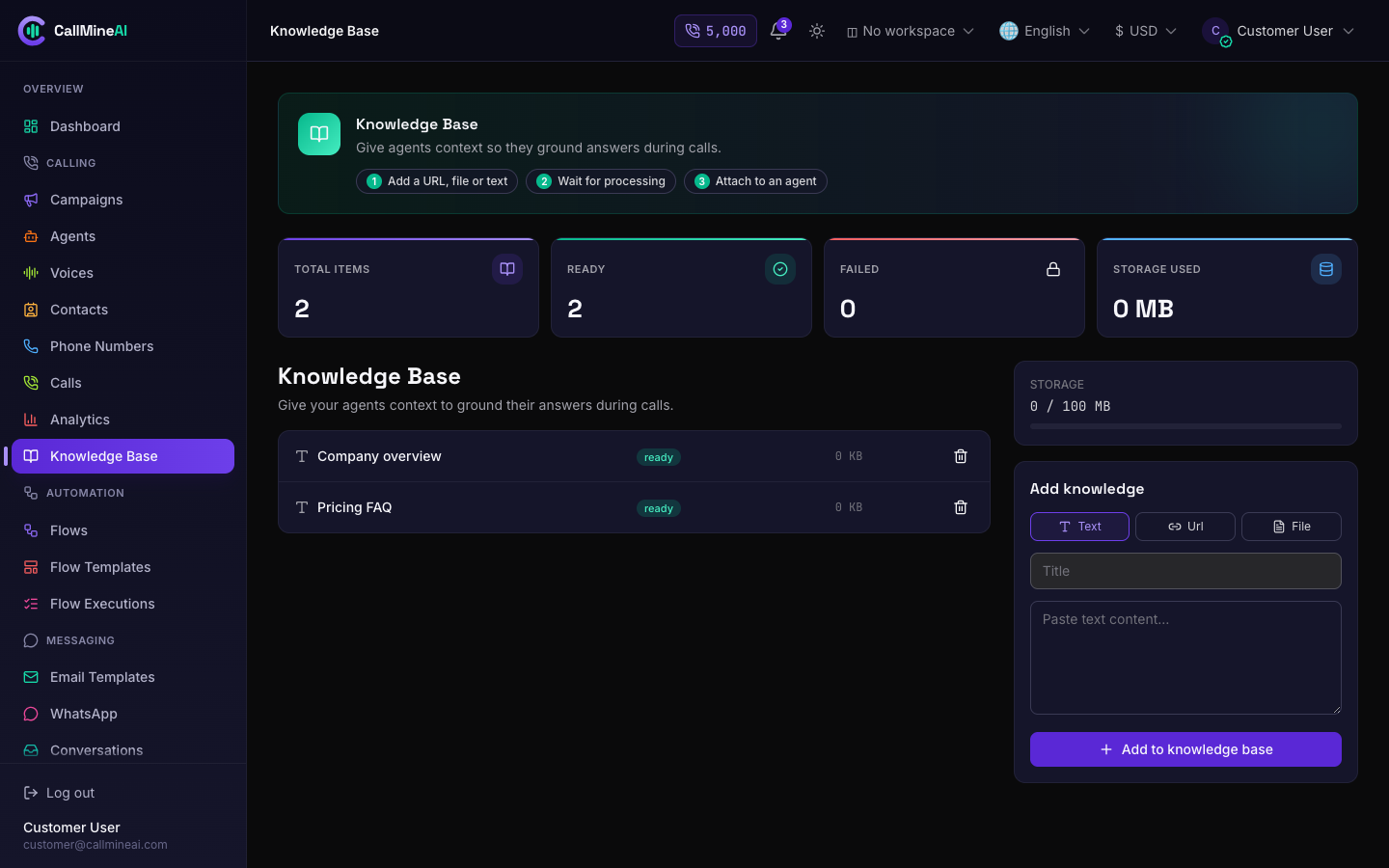
Knowledge-base items an agent can draw on during calls.
/app/knowledge-base
The knowledge base is your library of reference material — product facts, FAQs, policies — that agents use as context so they answer accurately.
Add an item in one of three ways:
| Type | How it's ingested |
|---|---|
| URL | CallMineAI fetches the page and extracts its text. |
| File | Upload pdf, doc, docx or txt (max 10 MB). |
| Text | Paste raw text directly. |
Each item has a status: Ready (usable) or Failed (e.g. a URL that couldn't be fetched). The page shows total items, ready count, failed count and storage used.
Storage limit
Knowledge‑base storage is capped by your plan's kb_mb limit. When adding an item would exceed it, the upload is rejected with a "storage limit reached" message. Remove old items or upgrade your plan.
How agents use the knowledge base
When an agent is on a call, its ready knowledge‑base items are used as context — the top items are injected into the system prompt so the model can reference your material while it talks. Keep entries focused and up to date: concise, high‑signal items produce the best answers.